
Descripción
- Thermocouple Data Logger with pluggable screw terminals
- 10 Year Battery Life
- 1 Second Reading Rate
- Multiple Start/Stop Function
- Ultra High Speed Download
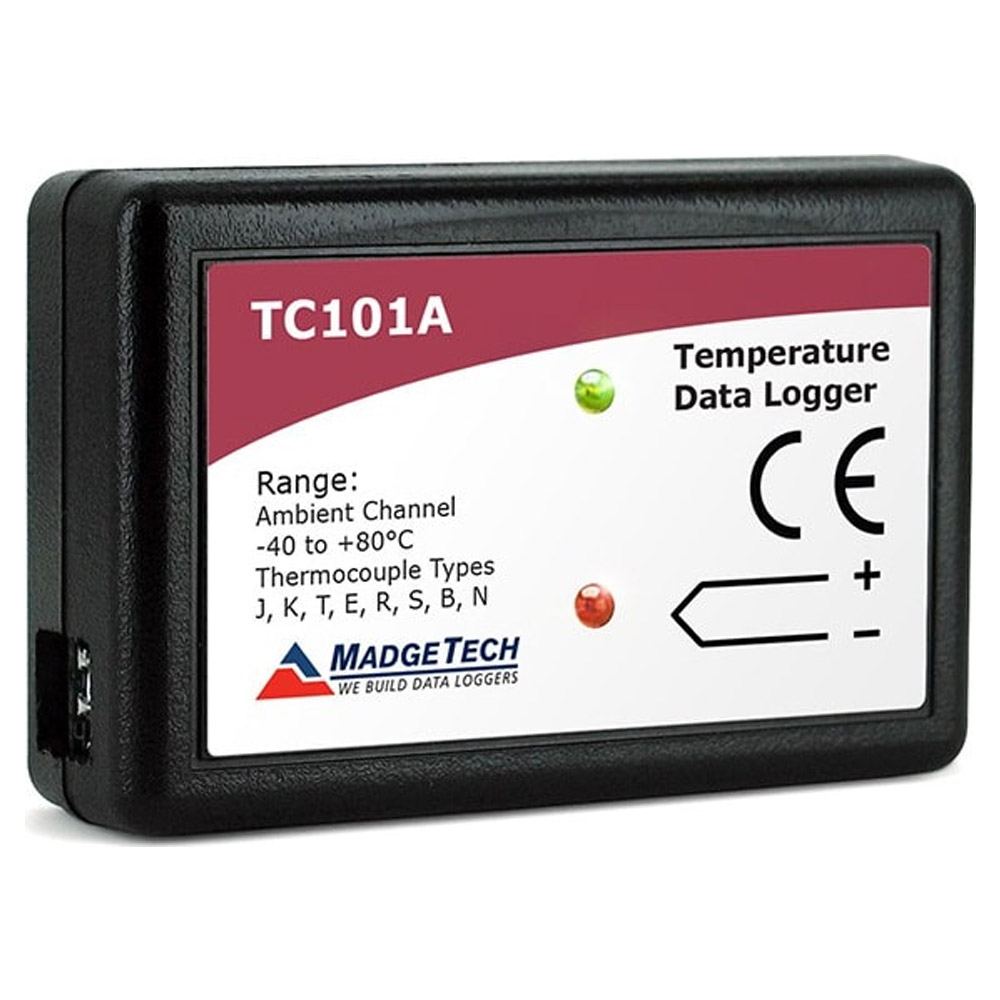
The TC101A temperature data logger, is a compact versatile device to be used with thermocouple probes for accurate temperature monitoring and profiling. This data logger is an ideal and affordable solution for applications such as HVAC studies, oven profiling, dry-ice shipments, process validation and many general purpose temperature monitoring applications. Compatible with eight different types of thermocouple probes, the TC101A can measure temperatures as low as -270 °C , and up to as high as 1820 °C (probe dependent), with an environmental operating temperature range of -40 °C to +80 °C for the data logger body. The 10 year battery life and the memory storage capacity of 500,000 readings with optional memory wrap makes the TC101A ideal for extended deployments. With the user friendly MadgeTech Data Logger Software, the TC101A is easily connected to a PC to download the collected data. The MadgeTech Software is capable of presenting the data in graphic, tabular, and summary formats for reporting. Data can also be exported easily to Excel for further analysis and calculations.
Product Notes
To change the thermocouple type:
– In the Connected Devices panel, click the device desired.
– On the Device Tab, in the Information Group, click Properties. Or, right-click the device and select Properties in the context menu.
– On the General Tab, change the Thermocouple type in the drop down menu.
– Apply these changes, there will be a prompt to reset the device, select yes.
LEDs
– Green LED blinks: 10 seconds to indicate logging and 15 seconds to indicate delay start mode
– Red LED blinks: 10 seconds to indicate low battery and/or memory and 1 second to indicate an alarm condition
Password Protection
An optional password may be programmed into the device to restrict access to configuration options. Data may be read out without the password.
Multiple Start/Stop Mode Activation
– To start device: Press and hold the pushbutton for 5 seconds, the green LED will flash during this time. The device has started logging.
– To stop the device: Press and hold the pushbutton for 5 seconds, the red LED will flash during this time. The device has stopped logging.
Alarm and Cumulative Alarm Delay
To change the alarm setting of a device:
– In the Connected devices panel, select the intended device to change the alarm settings.
– On the Device tab, in the Information group, click Properties. Users can also right-click on the device and select Properties in the context menu.
– Click the Alarm tab. If the Alarm tab is missing, the device does not have any alarm settings.
Configure the alarm settings:
– The High and Low settings indicate reading thresholds at which the alarm becomes active.
– The Warn high and Warn low settings indicate reading thresholds at which the alarm warning becomes active.
– The Delay setting indicates how long to wait before the alarm becomes active after passing an alarm threshold.
– The Use cumulative alarm delay checkbox indicates whether the alarm delay should reset when reading values fall back within the alarm threshold. Note: Available settings vary per model.
– Click the Apply button.
Note: Time durations between 12 hours to 23 hours, 59 minutes and 59 seconds may not be programmed. Only time durations up to 11 hours, 59 minutes and 59 seconds may be set in the hh:mm:ss field and the day field represents a 24 hour period.
Trigger Setting
The device can be programmed to only record based off user configured trigger settings. Choose Trigger Settings from the Device Menu: Start Device or Identify Device and Read Status. Trigger formats are available in Window and Two Point (bi-level) mode. Window allows for one range of temperature monitoring and two point mode allows for two ranges.
Wiring the Data Logger
MP Model Wiring
The standard connector is the SMP connection which allows for the user to insert a subminiature thermocouple plug into the connector on the device.
ST and TB Model Wiring
The TC101A-ST and TC101A-TB have a three position removable screw terminal. This enables the data logger.
Manufacturer Specs
| General Specifications | |
| Memory | 1,000,000 readings; software configurable memory wrap 500,000 readings in multiple start/stop mode |
| Reading Rate | 1 reading every second to 1 reading every 24 hours |
| Baud Rate | 115,200 |
| Cold Junction Compensation | Automatic |
| Channels | 1 Internal & 1 Remote |
| LED Indicators | Red & Green |
| Battery Life | 10 years typical at a 15 minute reading rate |
| Material | ABS plastic |
| Dimensions | 1.4 in x 2.2 in x 0.6 in (36 mm x 56 mm x 16 mm) |
| Operating Environment | -40 °C to +80 °C (-40 °F to +176 °F), 0 %RH to 95 %RH non-condensing |
| Required Interface Package | IFC200 |
| Approvals | CE |
| Weight | 0.0563 LBS |
| Temperature | |
| Internal Channel Temperature Sensor | Semiconductor |
| Internal Channel Temperature Range | -40 °C to +80 °C (-40 °F to +176 °F) |
| Internal Channel Temperature Resolution | 0.01 °C (0.018 °F) |
| Internal Channel Temperature Calibrated Accuracy | ±0.5 °C |
| Remote Channel Temperature Sensor | Thermocouple Types J, K, T, E, R, S, B ,N |
| Remote Channel Temperature Range | Thermocouple Dependent |
| Remote Channel Temperature Resolution | Thermocouple Dependent |
| Remote Channel Temperature Calibrated Accuracy | Thermocouple Dependent |
Tech Specs
Dataloggers / Data Acquisition/Dataloggers for Environmental Variables/Temperature Dataloggers Templ |
|
|---|---|
| Max Temperature | 176 F (80 C) |
| Min Temperature | -40 F |
| Power Source | Battery |
| Battery Life | 87600 HR |
Test Equipment General Attributes |
|
| Safety Approval | CE |
| Product Weight | 0.0563 LBS |
| Product Height | 0.6 IN |
| Product Length | 1.4 IN |
| Product Width | 2.2 IN |
| HTS/Schedule B Number | 9025.80.5000 |
| ECCN Number | EAR99 |
| Power Supply Voltage | Battery Powered |
| Country of Origin | United States |


Valoraciones
No hay valoraciones aún.