
Descripción
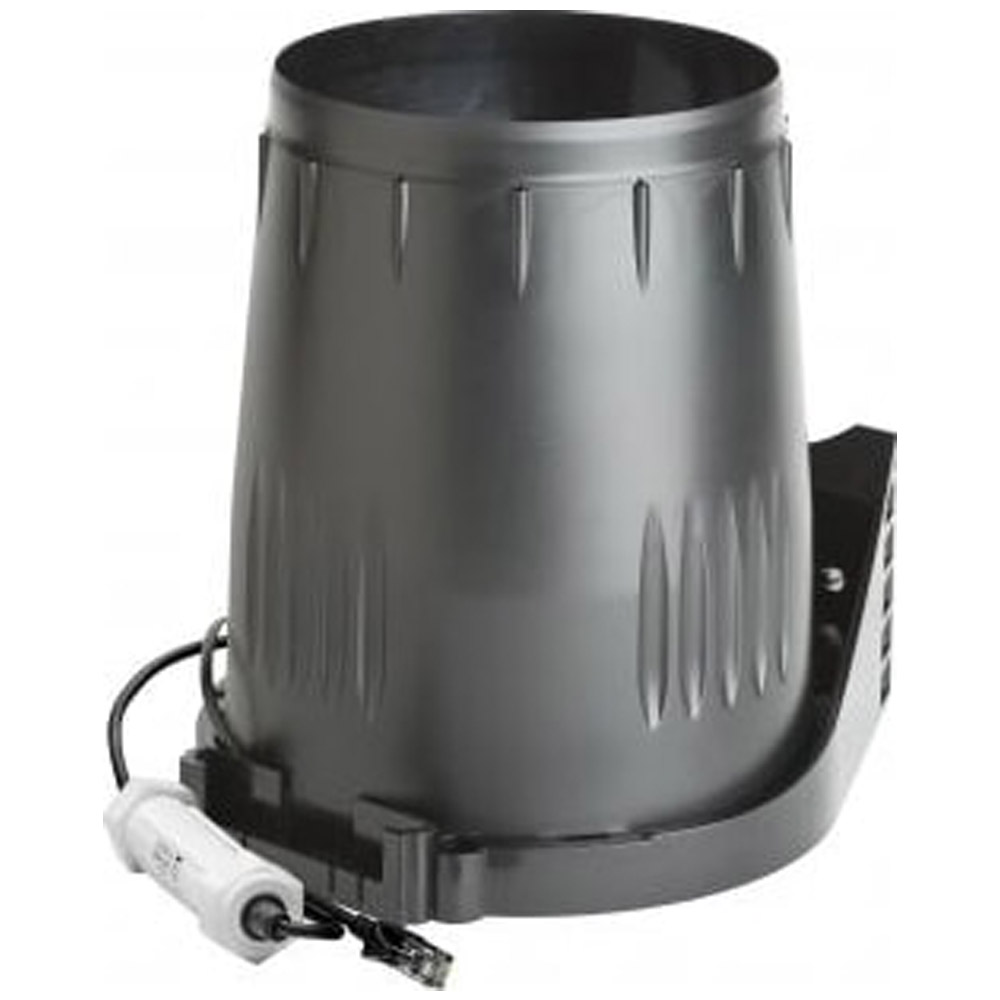
HOBO by Onset S-RGD-M002 – Davis (0.2mm) Rain Gauge Smart Sensor

- Measurement Range – 0 to 10.2 cm (0 to 4 in.) per hour, maximum 4,000 tips per logging interval
- Accuracy – ±4.0%, ±1 rainfall count between 0.2 and 50.0 mm (0.01 and 2.0 in.) per hour; ±5.0%, ±1 rainfall count between 50.0 and 100.0 mm (2.0 and 4.0 in.) per hour
- Resolution – 0.01 in. (S-RGC-M002) or 0.2 mm (S-RGD-M002)
- Calibration – Requires annual calibration; can be field calibrated
- Operating Temperature Range – 0° to 50°C (32° to 122°F), survival -40° to 75°C (-40° to 167°F)
Davis® Rain Gauge Smart Sensors are compatible with all HOBO weather station loggers, HOBOware, and HOBOlink. They offer the same ease-of-use as existing Onset Smart Sensors, providing cost-effective HOBO weather stations for projects on a tight budget. The sensors feature a plug-in modular connector for easy installation, and all configuration parameters are stored in the sensor and automatically communicated to the logger, eliminating the need for programming or extensive setup.
In what environment does this sensor operate?
This sensor operates in an outdoor environment.
What measurements does this sensor support?
The S-RGC-M002 sensor supports the following measurement: Rainfall
Operation
Rain enters the collector cone, passes through a debris-filtering screen, and collects in one chamber of the tipping mechanism. The tipping spoon tips when it has collected an amount of water equal to the increment in which the sensor measures (0.2 mm or 0.01 inch). As the spoon tips, it causes a switch closure and brings the second tipping spoon chamber into position. The rain water drains out through the screened drains in the base of the collector.
Components
The smart sensor includes the components shown on the diagrams on the next page. The smart sensor includes a hardware kit with the items most commonly needed for installation. The items you use from the kit depend on where you install the sensor. You may need to adapt or purchase additional hardware to fit your individual requirements.


Mounting
Mounting Considerations
Use the following guidelines to determine the best location for installing the sensor.
- You must mount the rain gauge smart sensor so that it is level. As built-in bubble level is attached to the base to simplify this process.
- Be sure there is an unobstructed path for water runoff from the drain screens.
- The sensor contains a magnet-operated switch that may not operate correctly if you mount the rain gauge on or near any object that is attracted to a magnet.
- Exposure to winds can reduce the measured rainfall amounts. Mount the sensor where there are no obstructions of rainfall at low angles (such as trees, houses, fences) and as low as possible out of the wind.
- If installing the sensor on a sheet metal roof, insulate the unit by making a platform out of wood. Mount the base of the rain gauge at least 4 cm (1 inch) away from any steel or iron surface and make sure the reed switch is at least 4 cm (1 inch) away from any steel or iron objects (e.g. nails).
- For the most accurate rainfall measurements, it is recommended that you mount the sensor upslope, about 3 meters (10 feet) away from the tripod, on a 1.5 meter high mounting pole (M-MPB). Alternatively, you can mount the sensor on the tripod mast.
- Tall objects can interfere with accurate rain measurements. It is recommended that you place the rain bucket away from the obstruction by a distance greater than three times the height of the obstruction. If that is not possible, raise the rain bucket as high as possible to avoid shedding.
- Avoid splashing and puddles. Be sure the gauge is high enough above any surface that rain will not splash into the top of the collector.
- Vibration can significantly degrade accuracy of the tipping bucket mechanism. In windy locations make sure that the bucket will be vibration-free. Consider using guy wires to secure a pole or tower-mounted bucket.
- To provide long-term protection from moisture entry, the smart sensor adapter must be mounted horizontally and with the cable wires routed with drip loops so that water drains away from the cable entry point as shown in the example below. When mounted properly, the housing is weatherproof (but not waterproof).

Preparing the Sensor
 1. Remove the cone from the base by rotating the base until the latches on the cone line up with the latch openings in the base, then lifting the cone away from the base.
 2. The tipping bucket on the base has been secured to avoid possible damage to the assembly. Carefully cut and remove the cable tie to release the bucket assembly.
Mounting on a Wooden Post or Flat Surface
- With a 5 mm (3/16 inch) drill bit, drill two holes approximately 54 mm (2-1/8 inches) apart. Use the metal backing plate as a guide when marking the holes and a carpenter’s level to ensure the holes are level.
- Insert the 1/4 inch x 3 inch lag screws through the metal backing plate and the holes in the mounting base into the post. Make sure the base is level by checking the built-in bubble level.
- Tighten the lag screws using an adjustable wrench or 7/16 inch wrench.


Mounting on a Pole or Mast
With the supplied U-bolt, the rain collector can be mounted on a pole having an outside diameter ranging from 32 to 44 mm (1-1/4 to 1-3/4 inch). A larger U-bolt (not supplied) can be used to mount to a pole with a maximum outside diameter of 64 mm (2-1/2 inch).
To mount on a smaller pole, obtain a U-bolt that fits the base openings but has a shorter threaded section. If the included U- bolt is used with a smaller pole, the bolt will interfere with the rain collector cone.
Use the built-in bubble level to ensure the sensor is level.
- While holding the mounting base against the pole, place the two ends of a U-bolt around the pole and through the two holes in the base.
- Slide the metal backing plate over the bolt ends as they stick out toward the rain collector cone. Secure the backing plate with a washer, a lock washer, and a hex nut on each of the bolt ends. Adjust the height of the rain collector, then tighten the nuts.
Completing the Sensor Installation
- To use bird spikes, insert one spike into each socket around the rim of the cone. The sockets are tapered; push firmly or tap lightly with a hammer for a more secure fit. Be careful; bird spikes may be sharp. Note: If you choose not to install the bird spikes, we recommend that you keep the packet of spikes in case birds become a problem in the future.
- Place the cone back onto the base by putting the latches on the cone into the latch openings in the base and rotating the cone clockwise until the latches “lock” into place. As you reattach the cone, make sure to run the cable to the cable slot in the base or the cone will not fit snugly against the base.
- Place the debris screen, pointed end up, into the cone. The screen prevents large bits of debris from blocking the funnel hole. If bird nesting is a problem, you can place a spike in the hole on top of the debris screen. Note that using a bird spike in the debris screen may make the screen more likely to be blown over or out in a high wind gust.
- To prevent fraying or cutting the cable where it is exposed to weather, secure it so it does not whip about in the wind. Use electrical tape or weather resistant cable ties to secure the cable. Place tape or ties approximately every 1 to 1.6 m (3 to 5 ft). Do not use metal staples to secure cables as they can cut the cables. Make sure there are drip loops on both sides of the smart sensor housing, which must also be mounted horizontally as described under Mounting Considerations.

Connecting the Sensor to a Station
To connect the sensor to a station, stop the station from logging and insert the smart sensor’s modular jack into an available smart sensor port on the station. See the station manual for details on operating stations with smart sensors.
Maintenance
For greatest accuracy, you should thoroughly clean the smart sensor at least once or twice a year.
- Separate the cone from the base.
- Use a soft damp cloth to clean pollen, dirt, and other debris from the cone, cone screens, and bucket.
- Use a pipe cleaner to clear the funnel hole in the cone and the drain screens in the base. When all parts are clean, rinse with clear water.
- Reattach the cone and replace the screen.
Field Calibration
The sensor is calibrated at the factory so the spoons tip (and record rainfall) for each 0.2 mm or 0.01 inch of rain. To adjust the calibration slightly, use a 5 mm (3/16 inch) wrench to rotate the adjustment screws located underneath the tipping spoons (see diagram in Components). Do not touch the reed switch.
The adjustment guide embossed in the platform shows how far you must rotate both screws in turn to effect a 1% and a 2% change.

Moving the screws in the positive (+) direction causes the spoons to tip more times (i.e. give a larger count) for a given amount of water. Modify both adjustment screws by the same amount.
To check the accuracy of the sensor, compare it with a tube type rain gauge. Use a rain gauge with an aperture of at least 10.2 cm (4 inches). Any smaller and the readings obtained may not be accurate. Place the tube type rain gauge directly next to the smart sensor. Compare the totals on three storms to determine whether your rain collector needs calibration and by how much. Adjust the screws to fine-tune the reading for the next three storms if necessary.
Manufacturer Specs
| HOBO by Onset Rain Gauge Smart Sensor Specifications | |
| Measurement Range | 0 to 10.2 cm (0 to 4 in.) per hour, maximum 4,000 tips per logging interval |
| Accuracy | ±4.0%, ±1 rainfall count between 0.2 and 50.0 mm (0.01 and 2.0 in.) per hour; ±5.0%, ±1 rainfall count between 50.0 and 100.0 mm (2.0 and 4.0 in.) per hour |
| Resolution | 0.01 in. (S-RGC-M002) or 0.2 mm (S-RGD-M002) |
| Calibration | Requires annual calibration; can be field calibrated |
| Operating Temperature Range | 0° to 50°C (32° to 122°F), survival -40° to 75°C (-40° to 167°F) |
| Environmental Rating | Weatherproof |
| Housing | UV-stabilized ABS plastic |
| Mechanism | Tipping bucket with magnetic reed switch pivots on metal shaft |
| Dimensions | 16.5 cm opening diameter (6.5 in.) x 24 cm (9.5 in.) high; 214 cm 2 (33.2 in. 2 ) collection area |
| Weight | 1 kg (2 lb, 3 oz) |
| Bits per Sample | 12 |
| Number of Data Channels* | 1 |
| Measurement Averaging | No |
| Cable Length Available | 2 m (6.6 ft) |
| Length of Smart Sensor Network Cable* |
0.5 m (1.6 ft) |
| CE | The CE Marking identifies this product as complying with all relevant directives in the European Union (EU). |
Tech Specs
Test Equipment General Attributes |
|
|---|---|
| Country of Origin | United States |

Valoraciones
No hay valoraciones aún.